Step 3 of 6 ⏱ about 4 min
Lights 2 and 3
What you're adding
Two more lights, the same way as LED 1. Short red jumper wires link battery + from relay 1's COM to relay 2's COM, and on to relay 3's COM.
⚠ Keep the battery wires away from the Arduino's red and blue rails.
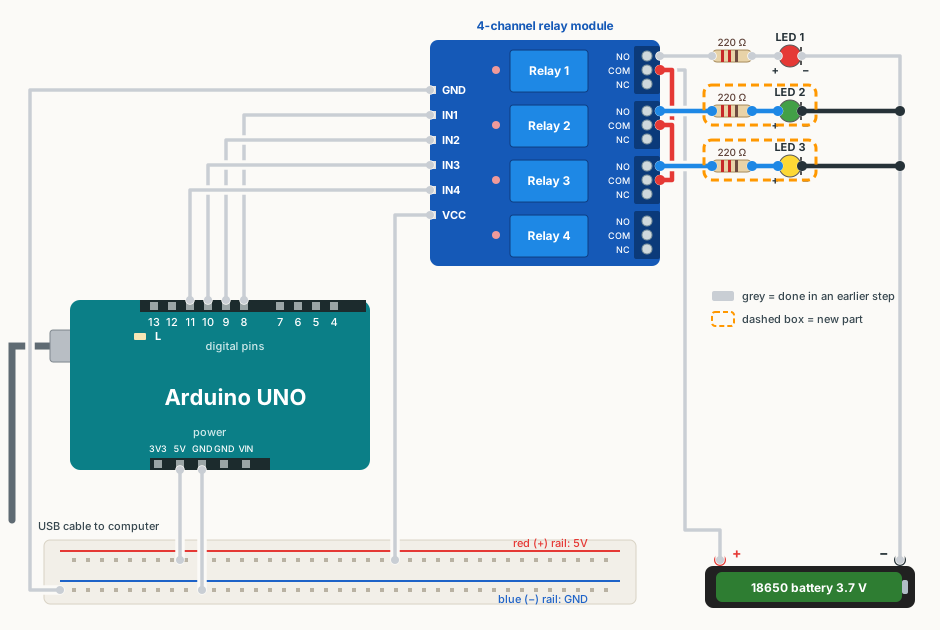
Wire it
✔ All ticked. Now upload the code.
Upload the code
This is the same relay test sketch from Step 1. If it is still on the board, you don't need to upload it again.
- Close the Serial Monitor if it is open.
- Download the sketch below and open it in Arduino IDE (File → Open). If the IDE asks to put it in a folder, click OK.
- Plug the USB cable back in. Check Tools → Board says Arduino UNO and Tools → Port shows your COM port.
- Click Upload (the round → arrow button). Wait for Done uploading.
Show the code
// Step 1: test the relay module.
// Turns relay 1, 2, 3, 4 ON one at a time (1 second each), then all OFF.
// Wiring: IN1 = pin 8, IN2 = pin 9, IN3 = pin 10, IN4 = pin 11.
// This relay module is "active-LOW": LOW turns a relay ON, HIGH turns it OFF.

const int RELAY_PINS[4] = {8, 9, 10, 11};
const int RELAY_ON  = LOW;
const int RELAY_OFF = HIGH;

void allOff()
{
  for (int i = 0; i < 4; i++) {
    digitalWrite(RELAY_PINS[i], RELAY_OFF);
  }
}

void setup()
{
  Serial.begin(9600);
  for (int i = 0; i < 4; i++) {
    pinMode(RELAY_PINS[i], OUTPUT);
  }
  allOff();
  Serial.println("Relay test starting");
}

void loop()
{
  for (int i = 0; i < 4; i++) {
    allOff();
    digitalWrite(RELAY_PINS[i], RELAY_ON);
    Serial.print("Relay ");
    Serial.print(i + 1);
    Serial.println(" ON");
    delay(1000);
  }
  allOff();
  Serial.println("All OFF");
  delay(1000);
}
You should see
- LED 1, LED 2 and LED 3 light up in turn, one at a time.
- Relay 4 still clicks, but nothing is connected to it yet.
If it doesn't work
LED 2 or 3 never lights
Check its COM jumper wire, then flip the LED. Swap it with LED 1 to see if the LED itself is faulty.
The LEDs light in the wrong order
The loads are on the wrong relays, or the IN wires are swapped. Relay 1 → LED 1, relay 2 → LED 2, relay 3 → LED 3.