Step 5 of 6 ⏱ about 5 min
Bluetooth
What you're adding
The HC-05 Bluetooth module. It lets your phone send letters to the Arduino. When it has power but isn't connected, its red light blinks fast.
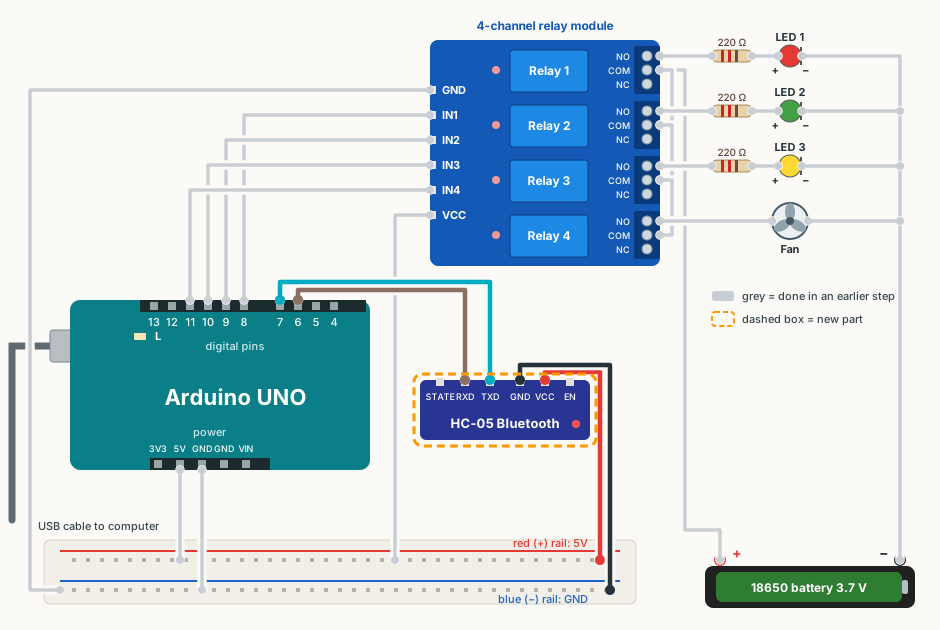
Wire it
✔ All ticked. Now upload the code.
Upload the code
- Close the Serial Monitor if it is open.
- Download the sketch below and open it in Arduino IDE (File → Open). If the IDE asks to put it in a folder, click OK.
- Plug the USB cable back in. Check Tools → Board says Arduino UNO and Tools → Port shows your COM port.
- Click Upload (the round → arrow button). Wait for Done uploading.
Show the code
// Step 5: test Bluetooth.
// Wiring: HC-05 TXD -> pin 7, HC-05 RXD -> pin 6.
// Every letter you type in the phone app is shown in the Serial Monitor as "Got: X".
// Every 5 seconds the Arduino sends "Hello from Arduino" to the phone.

#include <SoftwareSerial.h>

SoftwareSerial bluetooth(7, 6);   // (Arduino RX = pin 7, Arduino TX = pin 6)

unsigned long lastHello = 0;

void setup()
{
  Serial.begin(9600);
  bluetooth.begin(9600);
  Serial.println("Waiting for Bluetooth...");
}

void loop()
{
  if (bluetooth.available() > 0) {
    char c = bluetooth.read();
    // The phone app may also send "new line" characters. Skip those.
    if (c != '\r' && c != '\n') {
      Serial.print("Got: ");
      Serial.println(c);
    }
  }

  if (millis() - lastHello >= 5000) {
    lastHello = millis();
    bluetooth.println("Hello from Arduino");
  }
}
Set up the phone (Android only)
- Install Serial Bluetooth Terminal (by Kai Morich) from the Google Play Store.
- Plug the Arduino in so the HC-05 has power (its light blinks fast).
- On the phone: Settings → Bluetooth → Pair new device → HC-05. PIN: 1234 (or 0000).
- Open the app. Tap ☰ → Devices → Bluetooth Classic → HC-05. Allow “Nearby devices” if asked.
- Wait for Connected. The HC-05 light now blinks slowly.
- Type B at the bottom of the app and tap the send arrow.
You should see
- Serial Monitor (9600 baud) shows Got: B when you send B from the phone.
- The phone app shows Hello from Arduino every 5 seconds.
If it doesn't work
Nothing shows in the Serial Monitor
TXD and RXD are swapped (most common). Check HC-05 TXD → pin 7 and HC-05 RXD → pin 6. Also check the Serial Monitor is at 9600 baud.
The phone can't find HC-05
It must be an Android phone: iPhones can't see the HC-05. If the HC-05 light isn't blinking, it has no power: check its VCC and GND wires. Move closer.
There are lots of HC-05s in the list
Every group's module is called HC-05! Ask other groups near you to unplug theirs while you pair, or check that your module's light changes to a slow blink when you connect.
Pairing asks for a PIN
Type 1234. If that fails, try 0000.
The app says “connection failed”
Pair in the phone's Bluetooth settings first, then connect from the app. Only one phone can be connected at a time. Allow “Nearby devices” if the app asks.